
Klarna
Klarna Pay Later allows customers to split up their payments into several rates. If you have set up a Klarna agreement on the Acquiring page in Frisbii administration, the payment option will automatically be presented in Frisbii Checkout.
📈 Creating a Klarna Checkout Session
NoticeIt is a Klarna requirement that you send in order lines for a Klarna Payment. This allows for an accurate calculation of VAT per item in the basket and will give a more detailed Klarna invoice.
A billing address is required by Klarna. Note that it is not sufficient to reference a customer object. You will have to explicitly set a billing address field on the order-object of the charge call.
Sample request
curl -X POST \
  --url https://checkout-api.reepay.com/v1/session/charge \
  -u 'priv_xxxx:' \
  -H 'Accept: application/json' \
  -H 'Content-Type: application/json' \
  --data '{
    "order": {
        "customer_handle": "cust-0001",
        "handle": "klarna-test-1",
        "currency": "DKK",
        "order_lines":[
          {
            "ordertext":"Order text",
            "amount": 1000,
            "vat": 0.25,
            "quantity":1,
            "amount_incl_vat": "true"
          }],
        "settle":false,
        "billing_address":{
          "address":"Strøget 15",
          "city":"Hornbæk","country":"DK",
          "email":"[email protected]","first_name":"Gorm","last_name":"Bøgh",
          "postal_code":"3100","phone":"12345678"
        }
  }
}'
💵 Klarna as the only payment option
If you would like Klarna to be presented as the only option in Frisbii Payments Checkout, you can use the payment_methods parameter in the create session call. This will automatically expand the Klarna payment option.
Sample
curl -X POST \
  --url https://checkout-api.reepay.com/v1/session/charge \
  -u 'priv_xxxx:' \
  -H 'Accept: application/json' \
  -H 'Content-Type: application/json' \
  --data '{
    "payment_methods": ["klarna"],
    "order": {
        "customer_handle": "cust-0001",
        "handle": "klarna-test-1",
        "currency": "DKK",
        "order_lines":[
          {
            "ordertext":"Order text",
            "amount": 1000,
            "vat": 0.25,
            "quantity":1,
            "amount_incl_vat": "true"
          }],
        "settle":false,
        "billing_address":{
          "address":"Strøget 15",
          "city":"Hornbæk","country":"DK",
          "email":"[email protected]","first_name":"Gorm","last_name":"Bøgh",
          "postal_code":"3100","phone":"12345678"
        }
  }
}'
🔎 Custom Arguments
Custom arguments can be passed to Klarna in the optional session_data object. These data are only stored for the duration of the checkout session.
| Parameter | Description |
|---|---|
ssn | Optional value containing the customer's social security number. |
klarna_merchant_data | Optional unstructured data which allows sending merchant data to Klarna. Check here for details on how to populate this field. |
klarna_order_lines | Optional extra order line data. This is used by Klarna to show the customer more information about the products they ordered. This is an array of data with the following fields:
|
klarna_recurring_amount* | Optional recurring amount sent to Klarna. If missing, the subscription, then plan amount will be used instead, if available. Does not influence how much the customer gets charged. |
klarna_recurring_product_name* | Optional descriptive name for the subscription to be sent to Klarna. The customer will see this in the checkout, as well as their Klarna app. If missing, the plan name will be used instead, then the charge handle, and finally the account name. Maximum 45 characters, everything over that will be truncated. |
klarna_recurring_interval_count* | Optional parameter representing how often the customer will be charged for the subscription. Needs to be paired with klarna_recurring_interval_unit below. If missing, or not properly paired with the interval unit, the value will be implied from the subscription plan, if available. Defaults to 1 month. |
klarna_recurring_interval_unit* | Optional parameter representing how often the customer will be charged for the subscription. Needs to be paired with klarna_recurring_interval_count above. Supports year, month, week, day. If missing, or not properly paired with the interval unit, the value will be implied from the subscription plan, if available. Defaults to 1 month. |
*- only relevant for recurring or subscription sessions
Recurring Payments and Subscriptions
Recurring payments are only supported for the unified Klarna agreements (called simply Klarna). If you already have active agreements for any other Klarna product, for instance Klarna Pay Later, you will need a create a different Klarna agreement in order to enable Klarna subscriptions.
Release Authorization
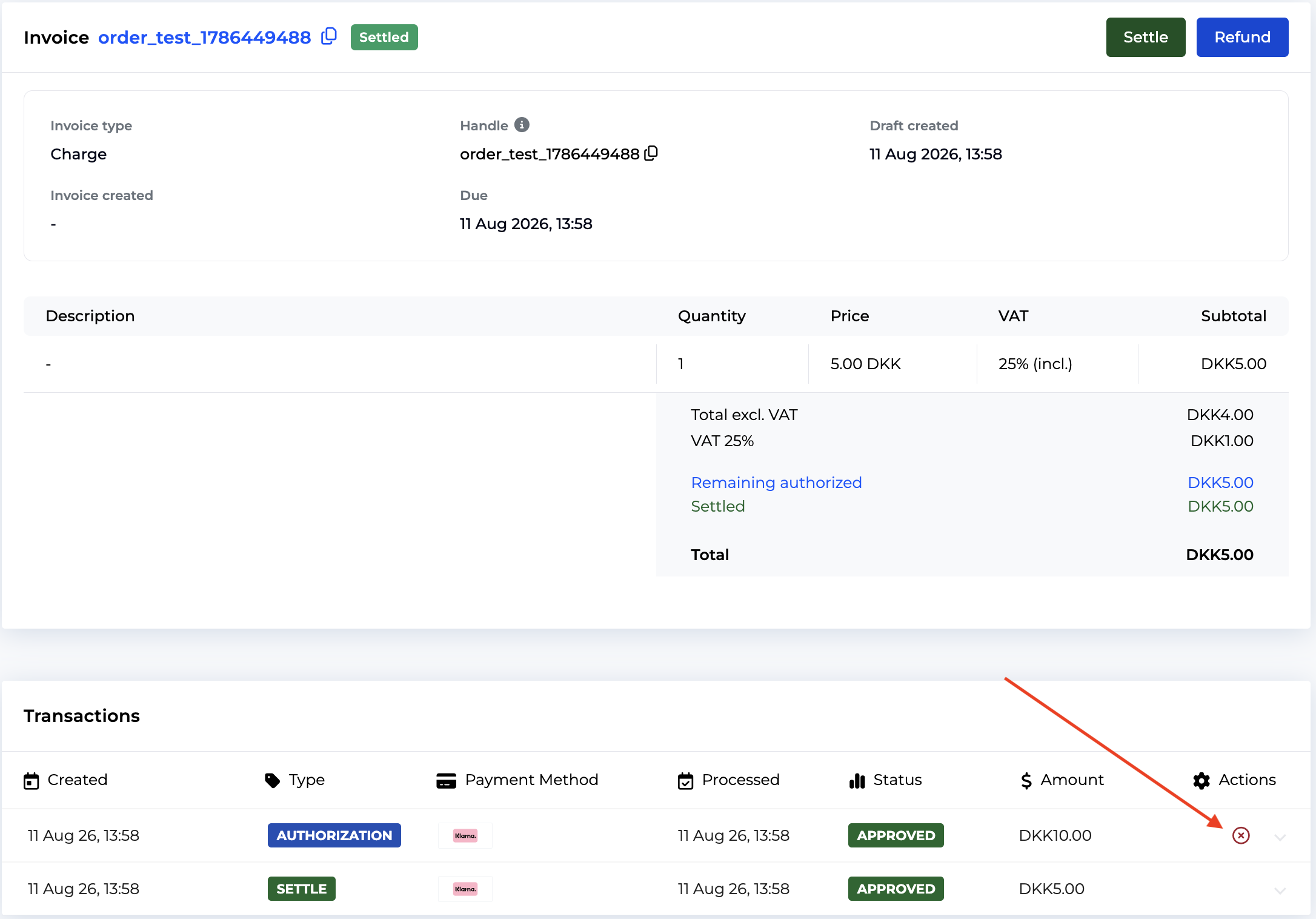
Klarna supports cancelling a partially-captured authorization. To achieve this, cancel the authorization transaction from the invoice page, as seen in the screenshot below, or perform this API call on the corresponding invoice and transaction.
Capture and Refund Extra Parameters
The capture and refund operations support passing additional data via the parameters field. Both support klarna_order_lines, enriching existing order line data (see Custom Arguments above), while the capture supports shipping information. See the linked API documentations for extra details.
📈 Test of Klarna
In order to test Klarna before going live, you can create a Klarna "Playground" account. This provides you with a test API username and test API key. Frisbii Payments support can setup a Klarna test acquiring agreement on your Frisbii Payments test account. Klarna provides test data in order to test both the success case ("approved") and rejections of payments.
Customer test data can be found here, and it is recommended to use for all flows.
NoteRecurring charges in the test environment will not work without the appropriate test customer details. Check the link above and make sure to use the right customer.
Troubleshooting
If checkout cannot create a Klarna session, it is possible that it's a country mismatch issue. The country cannot be set in checkout, but it is instead used in the following order:
- For most currencies, the country is fully determined by the currency itself (e.g. DKK → Denmark, SEK → Sweden, GBP → United Kingdom).
- For EUR, the customer's billing address country is used if it's part of the eurozone (Austria, Belgium, Bulgaria, Croatia, Finland, France, Germany, Greece, Ireland, Italy, Netherlands, Portugal, Spain); otherwise it falls back to the merchant account's country.
- If the currency isn't recognized by Klarna's country mapping at all, the merchant account's country is used directly.
Please check account's country under admin settings and ensure it matches the country registered in Klarna.
Updated 25 days ago