
Settlements
Settlements tell you what your acquirer or payment provider actually paid you, and what they deducted on the way. Where an invoice shows what the customer was charged, a settlement represents exact amounts that landed in your bank account.
Every settlement is a single line of money movement: one capture, one refund, one payout, or one fee. Grouped together, they reconstruct the full economics of a payment.
Where settlement data comes from
This data is imported from the various acquirers and payment providers which support detailed reporting. Account-level rows are recorded with type fee_other and represent a general fee that a acquirer.
Card acquirers
- Shift4
- Elavon (direct)
Alternative payment methods
- All the PPRO payment methods
- Klarna
Settlement types
| Type | Sign | Meaning |
|---|---|---|
capture | positive | Money the provider collected for you |
refund | negative | Money returned to the customer |
payout | negative | Money paid out to a recipient |
authorization_fee | usually negative | Fee for authorising a payment |
capture_fee | usually negative | Fee for capturing a payment |
refund_fee | usually negative | Fee for processing a refund |
payout_fee | usually negative | Fee for processing a payout |
card_scheme_fee | negative | Fee charged by the card scheme (Visa, Mastercard, etc.) |
interchange_fee | usually negative | Interchange passed through from the issuer |
discount_fee | usually negative | Acquirer's discount rate / merchant service charge |
fee_other | either | Anything else — including account-level charges not tied to a payment |
Sign convention: capture is always positive; refund, payout and card_scheme_fee are always negative. The remaining fee types can be either sign, because providers also issue fee corrections and refunded fees. In this case, a positive capture_fee is a fee being returned to you, not a data error.
All presented amounts are in major units, with up to 9 decimals.
Retrieve settlement data
Per invoice
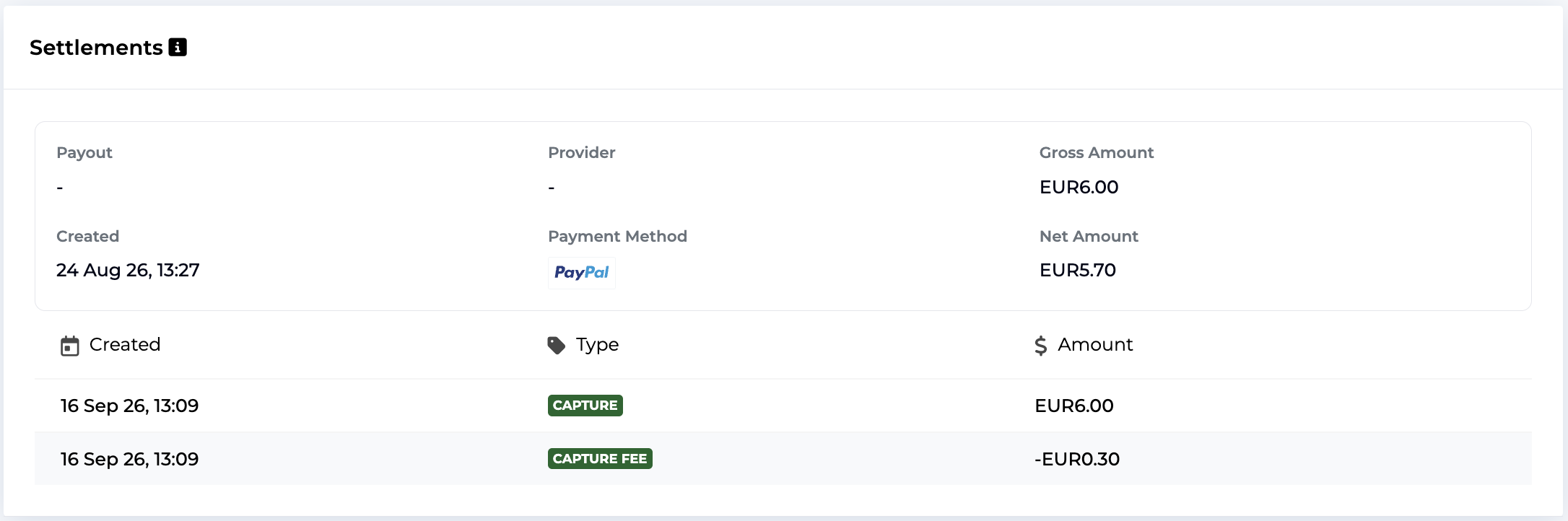
Use this endpoint to retrieve an aggregate report for the specified invoice. This contains the gross and net amount for the invoice in major units, as well as a list of settlements representing the breakdown. Each entry contains the amount, type, and the date where this corresponding amount has been processed.
The same information is also available in the admin view, for each invoice which has settlements.
Across a period
Use this endpoint over a date range and group the entries yourself. The range filters on the provider's booking date, which is what you want when matching against a bank statement:
GET /v1/list/settlement?from=2026-09-01&to=2026-09-30Page with next_page_token until it comes back empty. Other possible filters are available in the API docs.
Webhooks
Listen to the settlement_data_updated event, containing this payload:
{
  "event_type": "settlement_data_updated",
  "invoice": "inv-0005",
  "payout": null,
  "settlements": ["set_11d198b356899121119c7bde40220123"]
}
Each entry can then be fetched via GET /v1/settlement/{id}, or re-read the whole
picture for the invoice with GET /v1/invoice/{id}/settlement.
For fees that do not correspond to a single invoice (e.g. account-level fees), both the invoice and payout fields will be empty.
Mock data
On a test account, generate synthetic settlement data instead of waiting for a provider report with this endpoint.
Give it a list of already-settled invoices and a payment type. For each invoice it produces a capture and a capture_fee, plus a refund and refund_fee if the invoice has been refunded. Fees default to 5% of the amount unless you pass a fixed fee_amount. Zero-amount invoices produce nothing.
This is the way to exercise your reconciliation logic, including the negative-net and
fee-correction cases, without waiting for real data. On live accounts, this endpoint will not work.
Updated about 2 months ago